GuitarLab

Tablature · guitar · bass · every fretted instrument

Every bend, heard.

A tablature editor and player for guitar, bass and every fretted instrument. It opens the Guitar Pro, MusicXML, MIDI and TuxGuitar files you already have, plays every bend, slide and hammer-on on a modelled string, and engraves notation and tab together on a page you can print. That is GuitarLab.

  • · Guitar Pro 1 to 8
  • · MusicXML and MIDI
  • · modelled strings, amps, drums
  • · fifteen languages
  • · no account

· On iPhone and iPad from the App Store; in any browser, with nothing to install
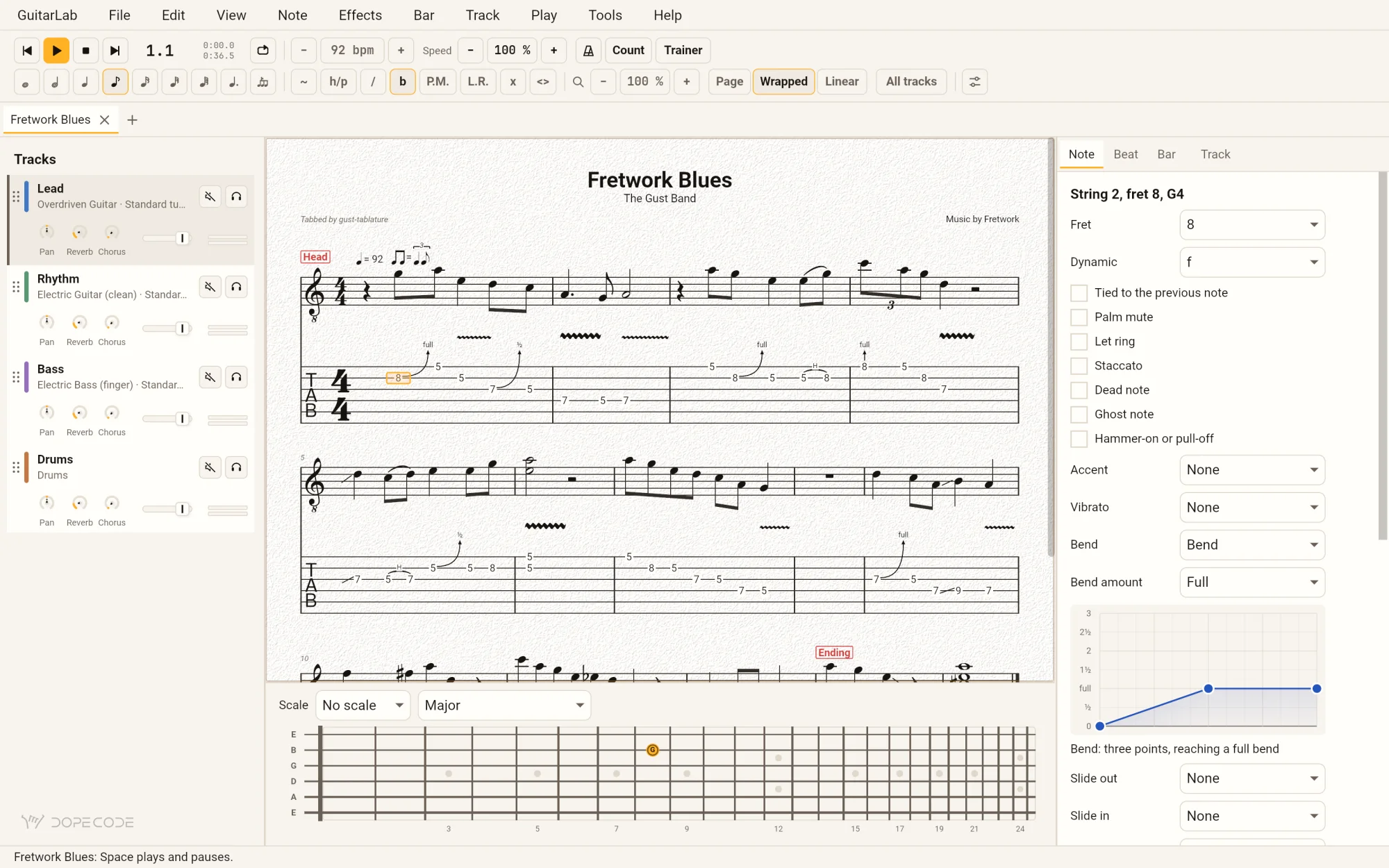
GuitarLab with a four-track blues open: the Lead, Rhythm, Bass and Drums tracks on the left, notation over tab in the middle with the caret on a fret 8 bent a full tone, the inspector on the right drawing that bend as a curve, and the fretboard below with the note lit.
GuitarLab on an iPhone, playing the blues: the transport with Pause lit, the score with the amber playback cursor in bar 4, and the fretboard below.

Real screens. Its own songs.

Every picture on this page is GuitarLab itself: the window drawn by its own --snapshot, the iPhone and the iPad in Apple's simulator, the browser in Chrome. Each is open on one of the four songs it ships with — a twelve-bar shuffle for a band, a DADGAD fingerstyle piece, a drop-D riff with a whammy dive, and one bar of every technique a tab can say.

The same four are on its welcome screen, under Songs to try, the moment it opens.

Hear it

Every technique, played as a string plays it.

A General MIDI player reads a tab as a keyboard would: a bend bends the whole channel, a hammer-on is picked again, a palm mute is only quieter. GuitarLab plays each string on its own.

A bend bends that string.
A hammer-on is not picked.

  • Every string modelled. A bend bends that string and no other, a hammer-on or pull-off sounds on the string still ringing, a palm mute damps it, a harmonic is touched at its node, and let ring rings.
  • A band to play with. Guitars and basses through modelled amps, a drum kit and a room; each track with its pan, reverb and chorus, muted and soloed as a mixer does it.
  • Or a DX7 on any track, from any .syx bank, kept with the song.
  • As written is as played. Repeats, endings, D.S., D.C., coda and fine, and tempo changes and ramps.
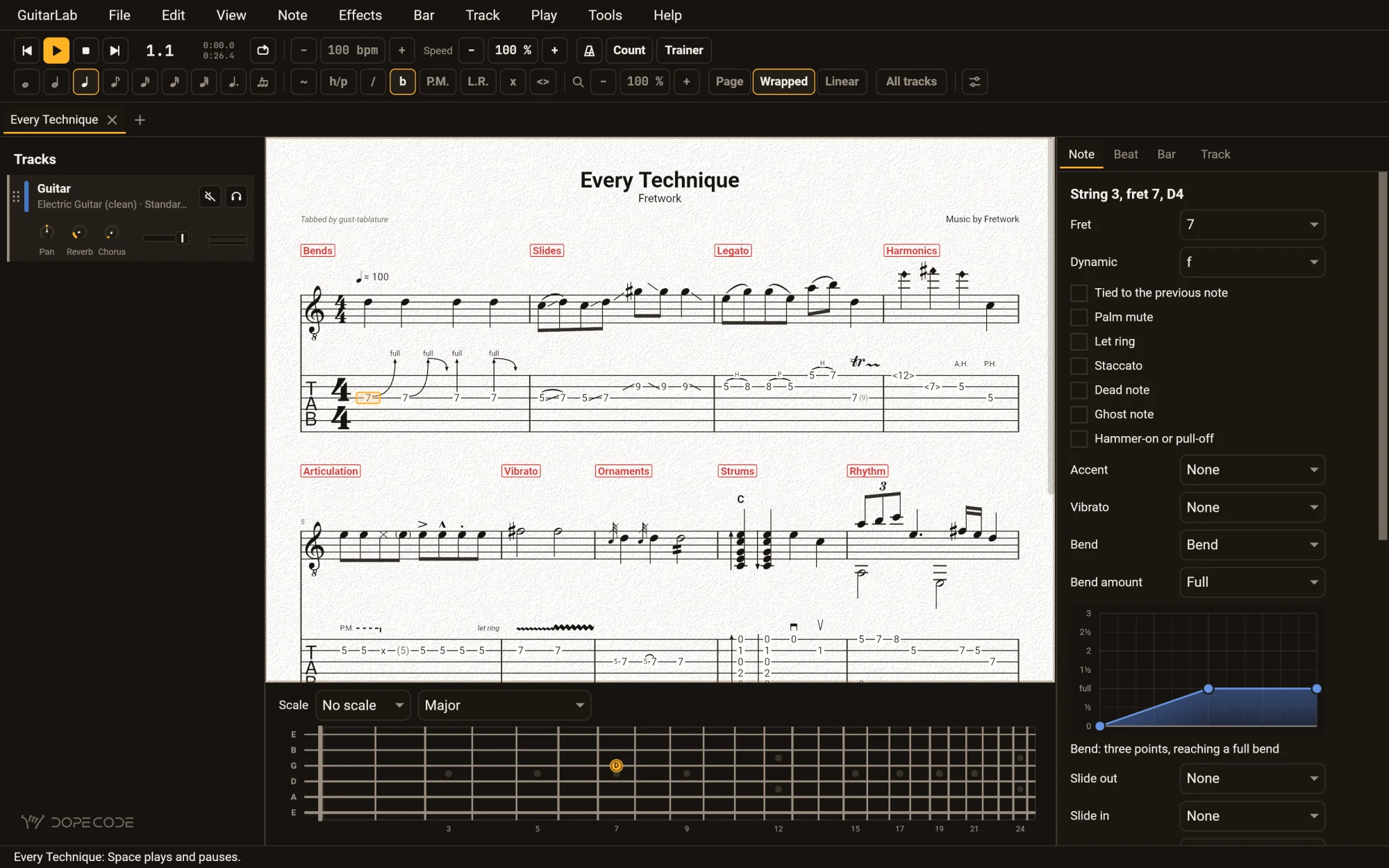
GuitarLab in the dark theme with Every Technique open: bars marked Bends, Slides, Legato, Harmonics, Articulation, Vibrato, Ornaments, Strums and Rhythm, the score on its light page, and the fretboard lighting the note under the caret.
Every Technique, one of the songs it ships with — the score stays a page in the dark theme, because it is a sheet you would print

Write it down

Type a fret. Hear it. See it engraved.

The caret sits on a string, a digit is a fret — 1 then 2 is the twelfth, as in Guitar Pro — and every effect has a letter. Notation and tab are engraved together with Bravura as you type, chord diagrams and all.

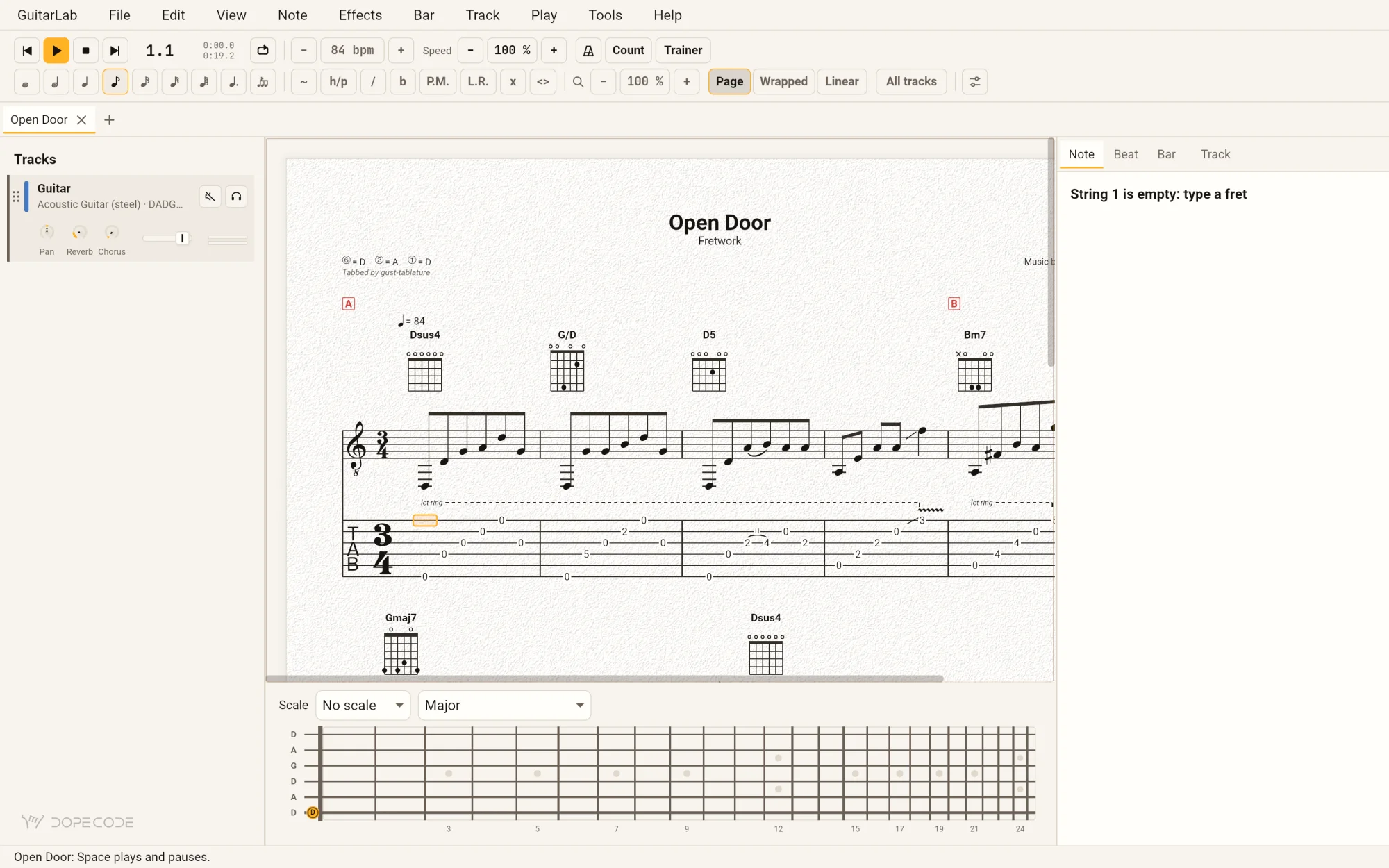
GuitarLab in Page view with Open Door, a DADGAD piece in 3/4: the title, the tuning, chord diagrams for Dsus4, G/D and D5 over notation and tab, a let-ring line, and rehearsal marks A and B.
0…9
The fret, on the string under the caret — heard as the key goes down
←→↑↓
The beat before and after, the string above and below
⌘1…⌘7
Whole note to sixty-fourth; . dots it, / makes a triplet
BHS
Bend, hammer-on or pull-off, slide
PVX
Palm mute, vibrato, dead note
⇧C
Name the chord — again for its other names
F4
Do the last edit again, here
Space
Play or pause
  • A live inspector beside the score for the note, the beat, the bar and the track; a bend or a whammy dive is a curve you drag on a grid.
  • A chord builder that names what you draw, and a chord finder with every voicing of a chord, open strings or not.
  • Four voices a bar. Insert, clear and repeat bars; paste over or between, as many times as you like; move beats across bar lines; fix ties.
  • Transpose the selection, a track or the song, chord names with it, and re-finger a passage onto other strings.
  • Every key is yours to change in Settings, and a key already taken is named before you take it.
  • A print sheet before paper, PDF or SVG: A4 or Letter, either way round, the music's size, a range of bars, the tracks, colour or black and white.

Practise

Slow it down. Loop it. Bring it back up.

What a guitarist does with a tab after reading it, each one a key on the toolbar.

LoopThe selection, round and round, until it is under your fingers
SpeedSlower or faster without touching the song's tempo
TrainerStarts slow and brings a passage up to tempo, step by step
Count-inA bar of clicks before it starts, and a metronome under it
FollowThe score turns with the playback, the cursor a bar in flight
FretboardLights what plays and what the caret is on — every fret, left-handed if you like
ScalesA scale or a chord laid over the neck, its roots marked
TunerListens through the microphone to the string you are tuning

iPhone & iPad · App Store

The same program, in your hand.

Not a companion app: the same GuitarLab, the screen its window, folding as a narrow window does. A tap is a click, one finger scrolls the score and two pinch it.

Tap a fret.
Play along with a record.

  • Tap the fretboard to write a note on the string under the caret, or type frets on a keyboard: arrows move, ⌘Z undoes, and every shortcut a desktop has.
  • It plays with the device silenced, and beside the music in another app, so you can play along with a record.
  • Files from anywhere Files reaches — the device, iCloud Drive, a server — and saved as a copy where you choose.
  • The tuner hears the microphone; the system asks you the first time.
  • Unsaved work is kept every five seconds, since iOS may end an app in the background without a word, and offered back on the next launch.
Download GuitarLab on the App Store

· One app for the iPhone and the iPad, iOS 18 or later

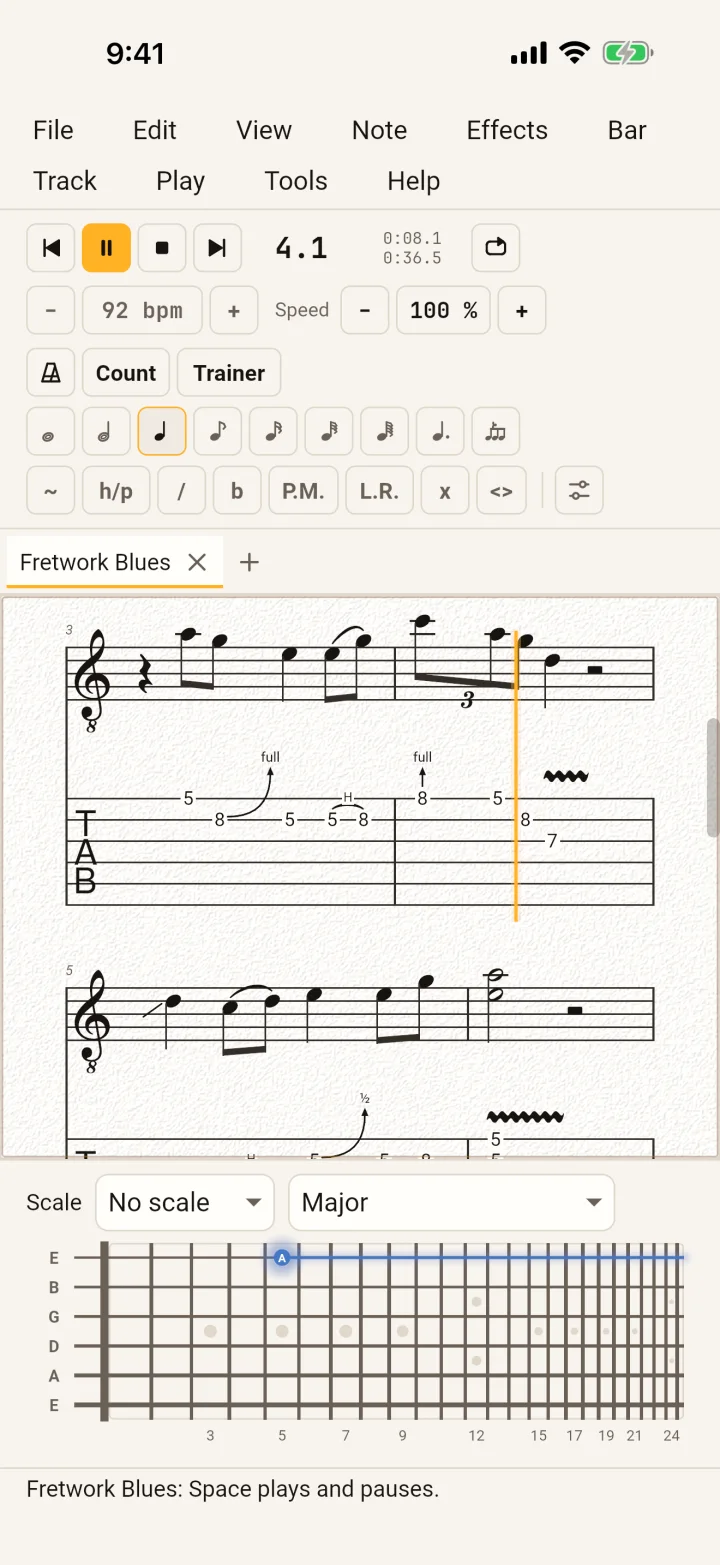
GuitarLab on an iPhone in the light theme, playing: Pause lit amber, bar 4, the score with its amber playback cursor and a full bend, and the fretboard below.
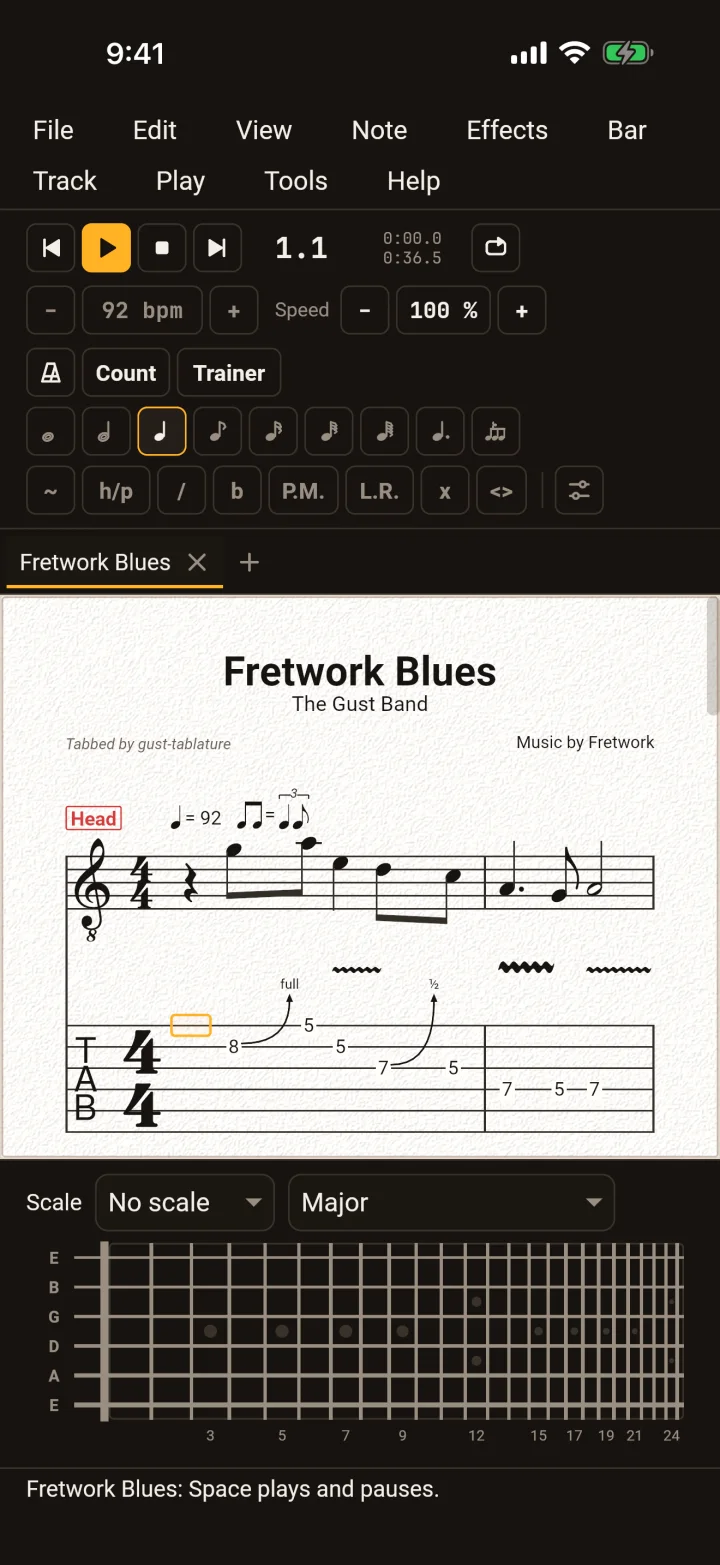
GuitarLab on an iPhone in the dark theme, the score on its light page and the toolbar's keys around it.

On an iPad,
the whole desk.

  • The track list, the score, the inspector and the fretboard side by side, as on a computer; in Split View or Stage Manager they fold away one at a time.
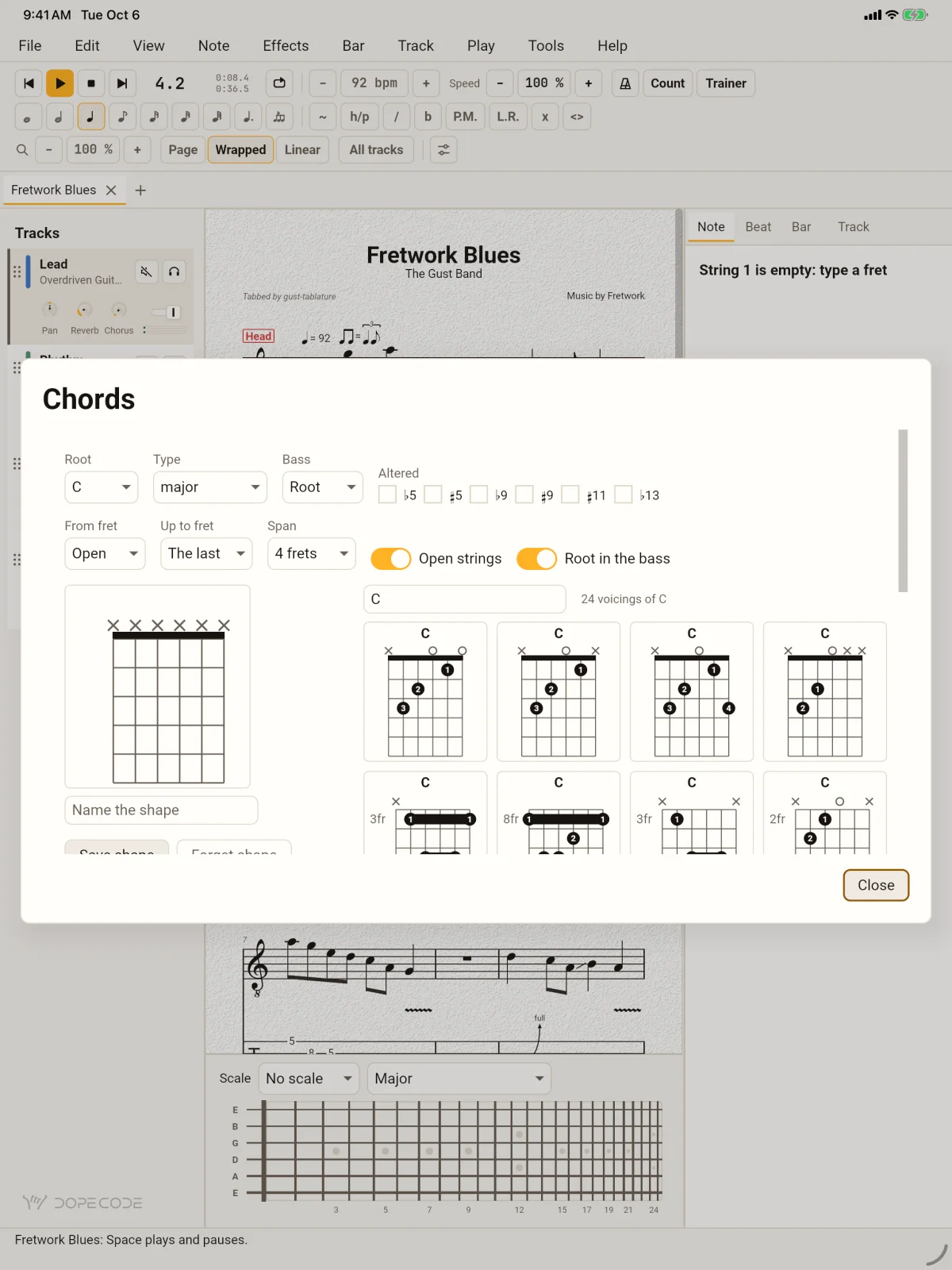
  • The chord finder as a sheet over the score: a root, a type, a bass, altered notes, and every voicing that fits the span you choose.
  • A hardware keyboard has the desktop's keys: frets, arrows, ⌘ shortcuts, Shift to select.
GuitarLab on an iPad with the Chords sheet open over the blues: root C, type major, open strings and root in the bass switched on, and eight of the twenty-four voicings of C as diagrams.

Your files

Opens what you have. Says what it could not.

A file is read by what is in it, not by its name. When it holds something GuitarLab cannot carry over, the status line says what, by name — and an export says what its format cannot hold, once the file is written. Nothing is lost quietly.

readswrites
GuitarLab.gtabyesyes — its own, holding everything a song can
Guitar Pro 1, 2.gtpyes—
Guitar Pro 3, 4, 5.gp3 .gp4 .gp5yesyes
Guitar Pro 6.gpxyes—
Guitar Pro 7, 8.gpyesyes
MusicXML.musicxml .xml .mxlyes, fretted for youyes
MIDI.mid .midiyes, fretted for youyes
ASCII tab.txt .tabyes, or pasted from the clipboardyes
TuxGuitar.tg0.7 to 1.5, and 1.6's format—
Power Tab.ptb1.7—
TablEdit.tef2 and 3—
LilyPond.ly—yes, notation over tab
PDF, SVG—yes, from the print sheet, as the screen draws it
WAV—yes, the band as it plays

Unsaved work is autosaved, and offered back after a crash or a closed tab.

Coming from TuxGuitar

Everything it does, and the sound it never had.

Your library comes over whole: every .tg from 0.7 on, and every format TuxGuitar reads. Point by point, from TuxGuitar's own source:

TuxGuitarGuitarLab
soundGeneral MIDI through a soundfontevery string modelled; amps, drums and a room built in; a DX7 per track
engravinghand-drawn glyphsBravura (SMuFL), beams by the meter, bend arrows, P.M. and let-ring extents; PDF and SVG that match the screen
editingmodal dialogs; two voicesa live inspector, a chord builder, bends drawn as curves; four voices; MIDI and MusicXML fretted for you
playbackrepeats and endingsand D.S., D.C., coda, fine, tempo ramps, a speed trainer, count-in and loops
safetynoneautosave, and recovery after a crash
everyone—a screen reader walks the score note by note; every key rebindable; dark and high-contrast themes
wheredesktop, Androidany browser, iPhone and iPad, and the desktop

Fifteen languages

Note names the way your teacher says them.

English, German, French, Spanish, Italian, Portuguese (Brazil), Dutch, Polish, Russian, Ukrainian, Czech, Swedish, Turkish, Japanese and Simplified Chinese — every menu, dialog and status line, and the score's own words. GuitarLab starts in your system's language and names the notes as guitarists in it do.

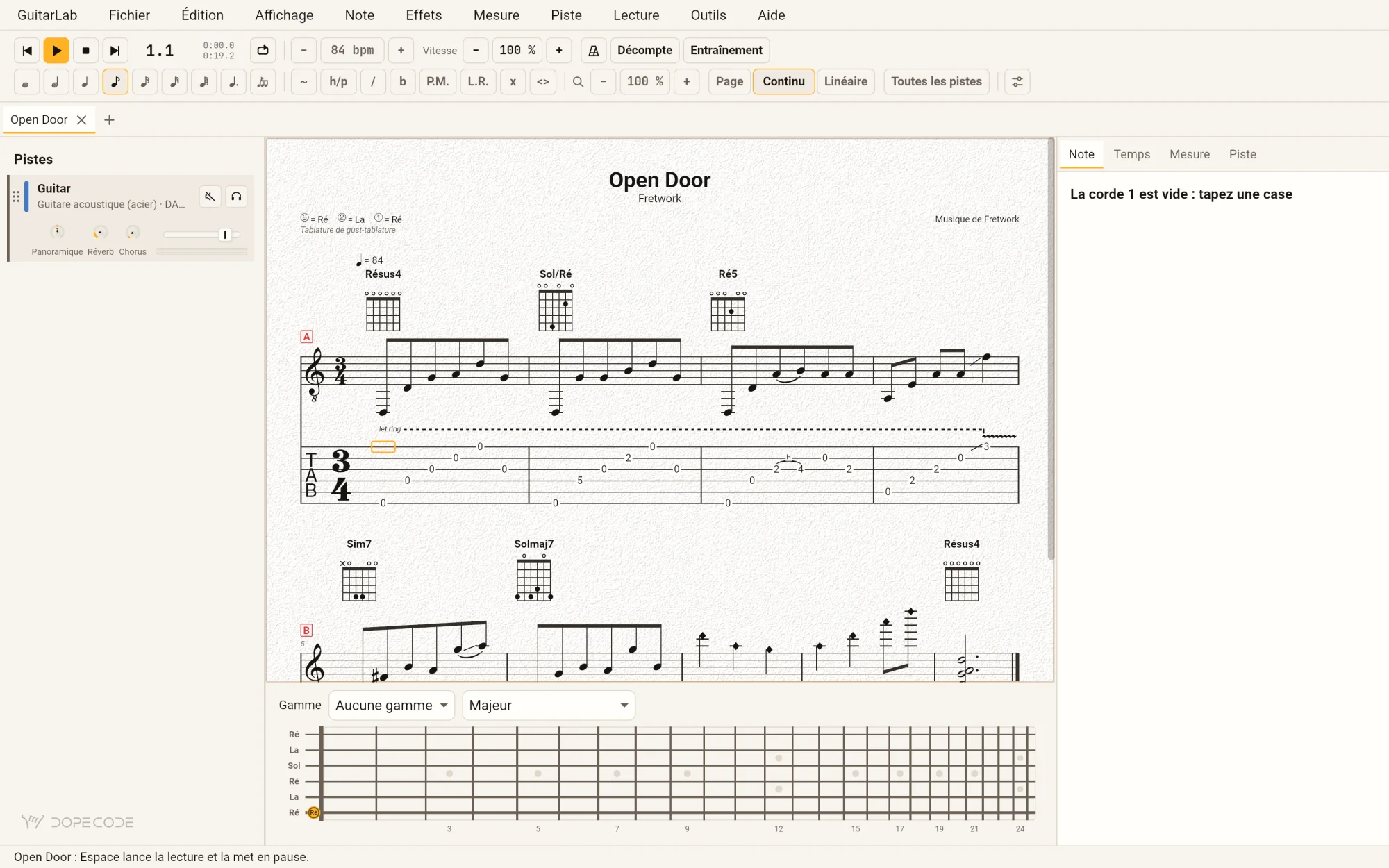
GuitarLab in French with Open Door: the menus Fichier, Édition, Affichage; chord names Résus4, Sol/Ré and Ré5 over the diagrams; the tuning ⑥ = Ré, ② = La, ① = Ré; and the fretboard's strings named Ré La Sol Ré La Ré.
In French: Résus4, Sol/Ré, Ré5 — and the neck tuned Ré La Sol Ré La Ré
noteschordsin
lettersC D E F G A BDm7, G/BEnglish, Dutch, Japanese, Chinese; Portuguese, Russian, Ukrainian and Turkish, whose chord charts use letters
GermanC D E F G A HDm7, G/H, B7 (= B♭7)German, Polish, Czech, Swedish
solfègeDo Ré Mi Fa Sol La SiRém7, Sol/SiFrench, Italian, Spanish, each in its own spelling; any language, by choice

Settings ▸ Language ▸ Note names chooses another, and the chord finder reads a chord typed that way — Rem7, Hm, Fis7. A file always keeps letters, so a song reads the same on every machine.

In a browser

Nothing to install.

The same GuitarLab, built for WebAssembly: it draws with WebGPU, or WebGL2 where a browser has none, and plays the same modelled band through Web Audio. Open a file from your disk, play it, edit it, and save it back.

guitarlab.dopecode.com/app/
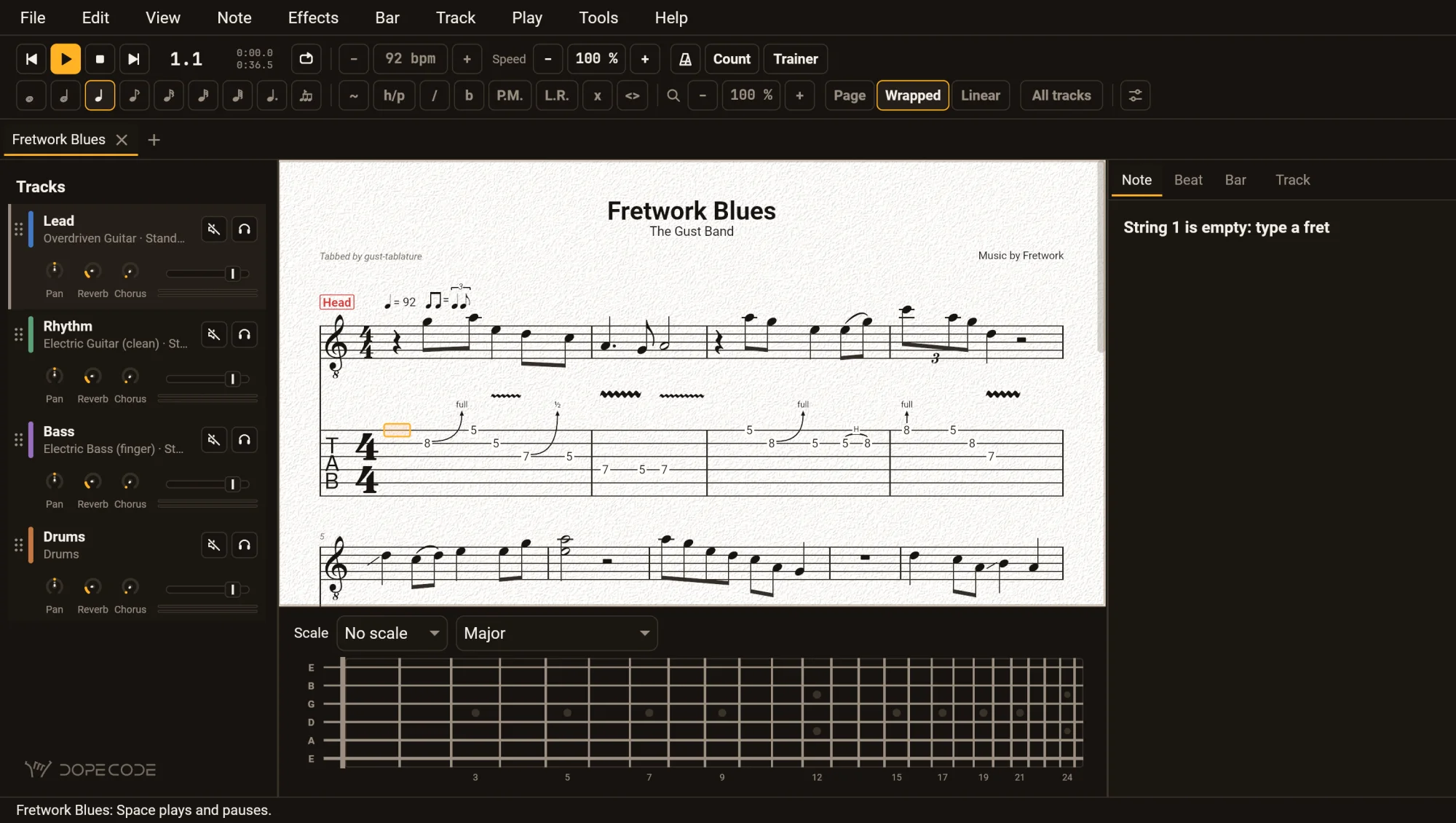
GuitarLab in Chrome in the dark theme with the blues open: the menus File to Help in the page, the toolbar, the four tracks, the score on its light page and the fretboard.
OpenThe browser's file chooser. The file is read inside the page, never uploaded
SaveA download, under the song's name; every Save downloads again
Unsaved workKept in this browser every five seconds, and offered back when you come back
SoundStarts with the first Play or the first note you type: a browser waits for you to do something
KeysThe desktop's, except the few the browser keeps for itself: ⌘W, ⌘N, ⌘T
Not hereThe tuner, since a page gets no microphone, and a tab pasted from the clipboard

· About 10 MB the first time; after that your browser keeps it

Privacy, itemised

Claims you can check.

The specific version, phrased so that you could go and verify it. The formal version is DopeCode's privacy policy.

your songs
Read and written where you say, and nowhere else. No account, no cloud of ours, no library to import into: a song is a file.
what it sends
Nothing. No analytics, no crash reporter, no network of its own. In a browser the page downloads the program from this site and then talks to no one; a file you open is read inside the page.
the microphone
Heard only while the tuner is open, to hear the string you are tuning — never recorded, never sent. In a browser there is no tuner, and the page is not allowed the microphone at all.
unsaved work
Kept on your device: the application's own folder on a computer, its own storage on an iPhone or iPad, this site's storage in your browser — and offered back to you, never to anyone else.
what it makes
A PDF, SVG, WAV or MusicXML file names GuitarLab <version> as its producer, and nothing about you or your machine. Guitar Pro, MIDI, ASCII and .gtab files have no such field and carry nothing.

The honest part

What it does not do.

Better read here than found out afterwards.

Not in GuitarLab

  • No MIDI out to an external synthesiser, and no soundfonts or plugin hosts (JACK, LV2, Audio Units): it plays its own modelled instruments instead.
  • No image export as PNG or JPEG; PDF and SVG instead.
  • No Android.
  • No sync and no cloud library. A song is a file, wherever you keep it.
  • Power Tab before 1.7 is refused: save the file again in Power Tab 1.7 first.

Where the platform gets in the way

In a browser a page is never given a file's place, so Save is a download every time and nothing is recent. Engraving a long score or rendering WAV runs on the page's one thread, so the page waits for it.

On an iPhone or an iPad the app is given a copy of a file and never its place, so Save saves a copy where you choose, every time. Option shortcuts on a hardware keyboard are typed as characters instead — a known gap.

Help

The questions people ask.

Will it open my Guitar Pro files?

Yes: .gtp, .gp3, .gp4, .gp5, .gpx and .gp, from Guitar Pro 1 to 8, recognised by what is in them. If a file holds something GuitarLab cannot carry over, the status line names it.

I opened a .gp5, and Save made a .gtab.

Save keeps GuitarLab's own format, which holds everything a song can, so nothing you add is lost the next time. To write Guitar Pro again, use File ▸ Export; it says what Guitar Pro cannot hold once the file is written.

How do I write a note?

Put the caret on a string — the arrow keys, or a click on the tab — and type the fret: 1 then 2 quickly is the twelfth fret. Or click a fret on the fretboard. Help ▸ Keyboard Shortcuts lists every key in use.

There is no sound.

In a browser, sound starts with the first Play (Space) or the first note you type: browsers wait for you to do something before a page may play. On a computer with no output device the status line says No sound, and everything else works.

Can I change the keys?

Every one. In Settings ▸ Keys, find an action by name and press its new key; a key another action already has is named before it is taken, and Reset brings back the default.

It closed before I saved.

Unsaved work is autosaved — every 30 seconds on a computer, every 5 in a browser or on an iPhone or iPad — and offered back the next time GuitarLab opens. The status line says what it recovered; save it to keep it.

Does the browser version upload my songs?

No. The file you choose is read inside your browser, and what you save is handed back to you as a download. This site sends the program, and that is all it does.

Is there a Mac, Windows or Linux version?

GuitarLab is built and tested on the Mac, and the toolkit it is drawn with runs on Windows and Linux too. Until a download is offered here, the browser version is the same program, with the same files and the same keys.

Still stuck? Write to hello@dopecode.com with your GuitarLab version (Help ▸ About) and what it said. If a file opens wrongly, the file itself helps most — when it is yours to share.

Browser · iPhone · iPad · Mac

One program, every screen.

GuitarLab is the same code drawing the same window wherever it runs: on the iPhone and the iPad from the App Store, and in your browser with nothing to install.

  • Any browser with WebGPU or WebGL2now
  • iPhone and iPad iOS 18 or laterApp Store
  • Mac macOS 11 or latercoming

· Questions first? Help answers the common ones.